This feature allows you to test the conversational experience with your Assistant, without impacting your production site or your metrics. You can simulate product search conversations, product information queries, or even support questions / FAQs.
Access Test Mode
In your navigation bar, click on the "Test Mode" button
The interface is divided into two areas:
- On the left : context configuration (page type, product...)
On the right : your Shopping Panel where you can chat with your Assistant, identical to the one on your site. This is where you play the role of the visitor.
💡 Test Mode uses the actual configuration of your knowledge base and your Assistant. Conversations conducted will not be saved or counted in your reports.
If your Assistant is still on the old version (the Legacy tag on the Shopping Assistant tab), it will not be compatible with Test Mode. You need to be on the current version by creating a new one.
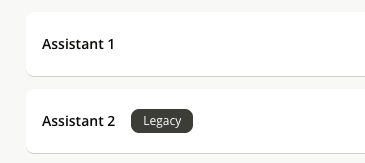
If your Assistant is still on the old version (the Legacy tag on the Shopping Assistant tab), it will not be compatible with Test Mode. You need to be on the current version by creating a new one.
Product page
- In the Visitor context section, select "Product page".
- You have two options to choose a product:
- Search bar: to search for a specific product, type its name or reference (ID).
- Browse my catalog : to display all of your products.
- Select the product of your choice
- The product will display with its name, image, description and price, as well as all fields uploaded to iAdvize by clicking on "View product details".
- You are ready to test your Assistant, either:
By clicking on Conversation Starter
💡 The Conversation Starters shown in Test Mode do not reflect your actual engagement strategies. Their style uses the default color and the questions are dynamically generated by AI. They are only meant as examples to test your Assistant.- By writing a free question in the Shopping Panel on the right
That's how you can also test FAQ-type or after-sales questions.
If you have not configured Conversation Starters, an information message will appear to offer you the option to activate this type of widget if you wish.
Category page
This section will be available soon.